If you’ve been granted access to your organization, you should have received an invitation email titled “Someone invited you to join Bulbshare! 👋”
Open this email and click “Join Bulbshare”, or go directly to https://my.bulbshare.com.
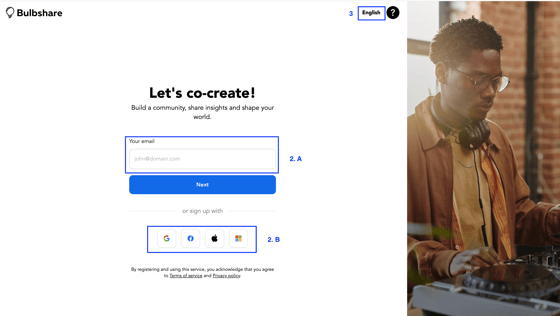
You’ll be directed to the Bulbshare sign-in page.
You can access your account in two ways:
- Enter your email address in the email box, click Next, and you will receive a confirmation email with an access link. If you have not already registered, you will need to do so. Once confirmed, you’ll be directed to your organization.
- Use the SSO login to access via Google, Facebook, Apple or Microsoft.
If you haven’t been granted access yet, your Organization Owner can add you.
If your Owner is a Bulbshare contact, please raise a support ticket through our Support Form to request access.
Comments
Please sign in to leave a comment.